English
 Nederlands
 Deutsch
 Français
 Español
 Português
 Italiano
 Polski
 中文
 हिन्दी
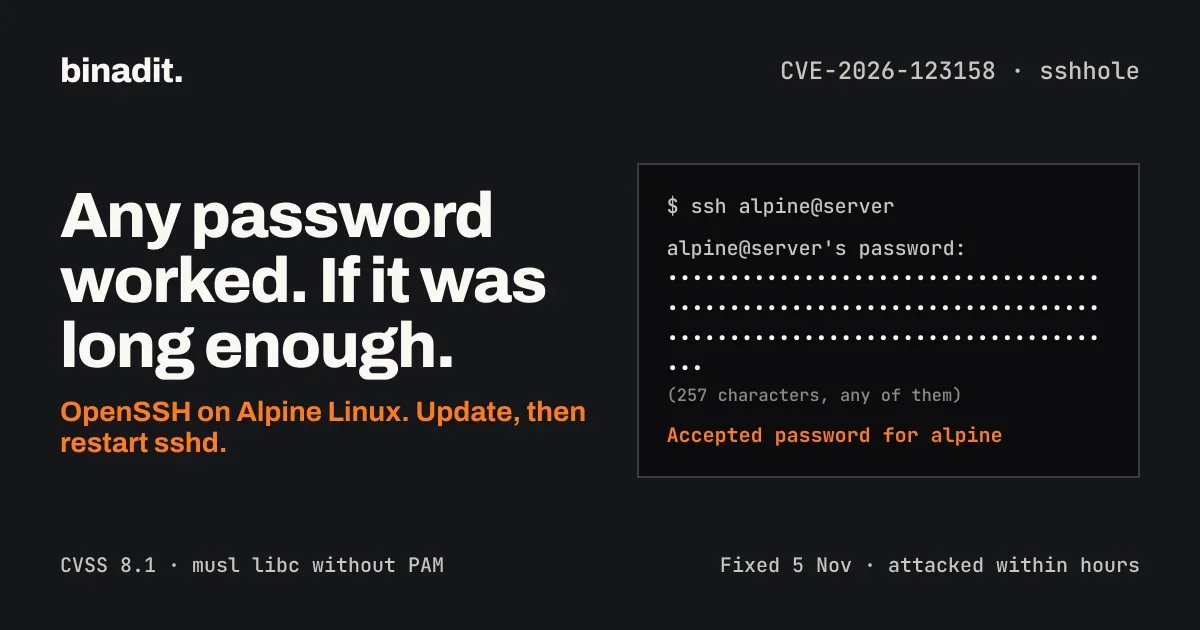
On some Alpine Linux servers, you could log in over SSH with any password, as long as it was long enough. CVE-2026-123158, nicknamed sshhole, is an authentication bypass in OpenSSH's sshd on Linux systems that use the musl C library without PAM. Alpine is the best-known example.
The trick is almost absurd. Send a password of 257 to 1024 bytes to an account that has no password set, and on an affected system the login succeeds. Each piece works as designed on its own, and the failure only appears when they meet.
OpenSSH released a fix within a day of the report, on 5 November 2026. Attackers did not wait. Threat intelligence firm Previdian reports exploitation attempts from just after midnight UTC on 6 November, and a successful root login on one of its Alpine honeypots. MITRE and Red Hat score it 8.1 out of 10.
The short version:
- What:
sshdaccepts a long password for an account whose password field is*, because musl'scrypt()returns*as its error value. - Who: Alpine Linux 3.16 to 3.24 and edge, and other musl-based systems, running
sshdwithout PAM and with password login enabled. - Not affected: glibc distributions such as Debian, Ubuntu, RHEL, Rocky Linux and Fedora, and any system that authenticates through PAM.
- Fix: OpenSSH 10.6p2, or the patched Alpine package for your branch, plus a restart of
sshd. - Stopgap:
PasswordAuthentication no, after you have confirmed that key-based login works.
Later in this article we look at the wider pattern. AI tools now rediscover bugs within hours, and the OpenSSH developers have already changed how they disclose them. That has consequences for any platform that holds something valuable on your behalf.
How the bug works
sshhole is not one bug but four reasonable decisions, made years apart by different projects, that line up into a login bypass. The OpenSSH developers say they do not consider the root cause to be within OpenSSH. musl maintainer Rich Felker calls it incorrect use by the caller, not a musl bug. Both are partly right, which is exactly the problem.
Piece 1: * means "no password"
On Unix, a password field of * in /etc/shadow has meant "no valid password" since 3BSD. No hash can ever produce it, so nobody can log in with a password. Alpine uses it for root in its base image since around 3.16, for key-only users created with adduser, and for the alpine user in its official cloud images.
Piece 2: musl's crypt() returns * on failure
In August 2012, musl decided that crypt() returns the string * on an error, rather than NULL. Later that month it capped SHA-crypt keys at 256 bytes, to protect against denial of service with huge inputs. A longer key is an error, so crypt() returns *.
glibc returns NULL on such errors, and callers that check for NULL handle it safely. That difference is why glibc systems are not affected.
Piece 3: sshd hashes passwords itself when there is no PAM
With PAM, sshd hands the password to the PAM stack and lets it decide. Without PAM, sys_auth_passwd() in auth-passwd.c hashes the attempt with crypt() and compares the result with the stored field using strcmp(). Alpine's default openssh-server package is built without PAM.
Piece 4: sshd borrows a salt from another account
crypt() needs a salt, and a field of * contains none. Since the fix for CVE-2016-6210 in July 2016, sshd then picks a salt from another account that does have a real hash, in pick_salt(). The goal was good: it makes a login attempt for a passwordless or non-existent account take as long as a real one, so attackers cannot tell valid usernames apart by timing.
Putting it together
Attacker sends password of 257+ bytes for user "alpine"

shadow entry for alpine:      *            (no password)
pick_salt() borrows salt:     $6$Xy7...$   (from an account with a real hash)
crypt(long_password, salt):   *            (musl: key over 256 bytes, error)

strcmp("*", "*") == 0  ->  password accepted  ->  shell as alpine
The attack needs four conditions at once, according to the Alpine advisory:
sshdruns without PAM: theopenssh-serverpackage, oropenssh-server-pamwithUsePAM no.PasswordAuthenticationisyes, which is the default.- A login-capable account has
*as its password field. - At least one local account has a
$5$or$6$hash, so there is a salt to borrow.
The last condition is the subtle one. A fresh Alpine cloud instance is safe on first boot. It becomes exploitable the moment anyone sets a password on any account, for example a console password for emergencies.
Why root is usually, but not always, safe
The default PermitRootLogin prohibit-password blocks password logins as root, so root:* alone is not enough. The danger is a second account. In the official Alpine cloud images, the alpine user has * as its password and can become root through doas without a password. A bypass into alpine is therefore a bypass into root.
The fix
OpenSSH 10.6p2 adds a minimum length check in sys_auth_passwd():
#define MIN_PASSWORD_HASH_LEN 4

ret = encrypted_password != NULL &&
    strlen(pw_password) >= MIN_PASSWORD_HASH_LEN &&
    strcmp(encrypted_password, pw_password) == 0;
A stored value shorter than four characters, such as * or !, can no longer match anything. Felker expects musl to change its behaviour in a coming release as well, so the defence will end up in two places.
The lesson for engineers is broader than this bug. Two different ways of saying "no match" were compared with each other, and they happened to be the same string. An error value that looks like valid data is a trap, wherever it sits in your code.
Who is affected
Alpine Linux 3.16 to 3.24 and edge are affected when the four conditions above hold, and so are other musl-based systems that run OpenSSH without PAM. Most Alpine containers are not, because they do not run sshd at all.
| Environment | Exposed? | Why |
|---|---|---|
Alpine servers and VMs with sshd |
Yes, if the four conditions hold | Default openssh-server has no PAM, and password login is on by default |
| Official Alpine cloud images, 3.18.11 to 3.24.3 | Not as shipped, but one step away | The alpine user has * and passwordless doas. Setting any password elsewhere makes it exploitable |
| Alpine cloud images from 3.21.10, 3.22.8, 3.23.8, 3.24.4 | No | Built with the fixed package |
Alpine Docker containers without sshd |
No | Nothing listens for SSH |
Docker images that install openssh-server |
Possibly | Rebuild on the fixed package, or remove sshd |
| Buildroot or Yocto images built with musl and OpenSSH | Possibly | Same four conditions. No distribution tracks these, so ask the vendor |
OpenWrt with openssh-server installed |
Possibly | The default Dropbear server is not affected |
| Debian, Ubuntu, RHEL, Rocky Linux, AlmaLinux, Fedora | No | glibc returns NULL from crypt(), and these builds use PAM |
| Directory users via musl-nscd (nslcd, winbind, sssd) | Yes, on affected hosts | These accounts have no shadow entry, so they look like * |
Two groups deserve extra attention. Appliances often run Alpine or a musl-based build under the hood, and you may not know it. Firewalls, NAS boxes, routers and monitoring appliances with an SSH management interface belong on your list. Old releases are the second group: Alpine releases before 3.16 get no patched package. For those releases, move to a supported branch or disable password login while you plan the upgrade.
Red Hat confirms that none of its products are affected, because they link OpenSSH against glibc and use PAM by default.
Fix status and timeline
Patched packages exist for every Alpine branch from 3.16 to edge, released the same day as the advisory. Exploitation attempts started within hours, so the gap between disclosure and attack was effectively zero.
| Alpine branch | Fixed openssh package |
|---|---|
| edge | 10.6_p2-r0 |
| 3.24 | 10.3_p1-r2 |
| 3.23 | 10.2_p1-r1 |
| 3.22 | 10.0_p1-r11 |
| 3.21 (end of support 1 November) | 9.9_p2-r1 |
| 3.20 | 9.7_p1-r6 |
| 3.19 | 9.6_p1-r3 |
| 3.18 | 9.3_p2-r4 |
| 3.17 | 9.1_p1-r7 |
| 3.16 | 9.0_p1-r6 |
| before 3.16 | No vendor package. Upgrade or disable password login |
Upstream, the fix is in OpenSSH 10.6p2. Other musl-based builds need that release or the backported patch.
How fourteen years of decisions came together
| When | What happened |
|---|---|
| 9 Aug 2012 | musl makes crypt() return * on error instead of NULL |
| 29 Aug 2012 | musl caps SHA-crypt keys at 256 bytes |
| 15 Jul 2016 | OpenSSH's fix for CVE-2016-6210 starts borrowing salts from other accounts |
| 23 May 2022 | Alpine 3.16, the earliest affected release, ships with root:* |
| 4 Nov 2026 | Özgün Kültekin of Wakefield reports the bug to OpenSSH |
| 5 Nov 2026 | OpenSSH 10.6p2, Alpine advisory and fixed packages, musl advisory, CVE published |
| 6 Nov 2026, 00:05 UTC | First exploitation attempt seen by Previdian |
| 8 Nov 2026 | Previdian counts 19 attempts from 12 IP addresses in 8 countries, seen by 4 sensors |
Dates up to 2022 come from Konfirmity's reconstruction. Previdian's findings are its own and have not been independently confirmed. As of its last update, the CVE was not in CISA's Known Exploited Vulnerabilities catalog.
One caution: Previdian warns that the public proof-of-concept code on GitHub is unverified and may contain malware. Do not run it on anything you care about.
What to do now
Update openssh and restart sshd. If you cannot do that today, turn off password authentication. Either step closes the hole, and together they are better than one.
1. Find every host and container running sshd on musl
# Is this an Alpine or other musl system?
cat /etc/os-release
ldd --version 2>&1 | head -1    # prints "musl libc" on musl systems

# Does sshd run, and with which settings? (as root)
sshd -T | grep -i -E 'passwordauthentication|usepam|permitrootlogin'
A confirmed passwordauthentication no or PAM-backed authentication removes this attack path. Check the effective configuration for the relevant account as well, because Match blocks can change SSH settings. Do this for every Alpine host, every running container with sshd, and every appliance with an SSH management port.
2. Check your accounts
# Accounts with * as password field (possible targets)
awk -F: '$2 == "*" {print $1}' /etc/shadow

# Accounts with a real SHA hash (the salt donors)
awk -F: '$2 ~ /^\$[56]\$/ {print $1}' /etc/shadow
If both lists contain a login-capable account and password login is on, the host is exploitable until patched.
3. Patch and restart
apk upgrade -U -a
rc-service sshd restart
apk info -v openssh-server    # compare with the table above
The restart is not optional. A running sshd keeps using the old code until it restarts.
For containers, rebuild the image on the fixed package and redeploy. Updating inside a running container is lost on the next deploy.
4. Can't patch yet? Turn off password login
First make sure key-based login works, and keep your current session open until a new login succeeds. Then, as root, following Alpine's instructions:
mkdir -p /etc/ssh/sshd_config.d
echo 'PasswordAuthentication no' > /etc/ssh/sshd_config.d/00-no-passwords.conf
sed -i.bak -e '1i PasswordAuthentication no' \
  -e 's/^\(\s*PasswordAuthentication[^y#]*\)yes/\1no/i' \
  /etc/ssh/sshd_config
sshd -t && rc-service sshd restart
sshd -T | grep -i passwordauthentication    # must print: passwordauthentication no
The drop-in directory is read from Alpine 3.19 onwards. On older releases, the sed line changes the main configuration. On releases before 3.16, there is no vendor backport; upgrade to a supported branch or keep password login disabled.
5. Look for signs of abuse
# A password login for an account that has no password is a red flag
grep 'Accepted password for' /var/log/messages

# Suspiciously long password attempts often show up as failures first
grep -E 'Failed password|Accepted password' /var/log/messages | tail -50
An unexpected Accepted password line for alpine, root or any key-only user is a strong indicator of compromise and calls for incident investigation. Also check doas usage, new user accounts, changed authorized_keys files and recently modified files. If you cannot rule out an unauthorised login, rebuild the machine rather than clean it.
6. Harden SSH so the next bug hurts less
This bug only worked because password login was switched on. Most servers do not need it.
- Use keys only:
PasswordAuthentication noandKbdInteractiveAuthentication noas standard. - Keep root out: leave
PermitRootLogin prohibit-password, or setno. - Limit who can try: restrict port 22 with a firewall or a VPN, so the whole internet cannot reach it.
- Allow-list users:
AllowUsersorAllowGroupslimits which accounts can log in at all. - Lock unused accounts: an account that should never log in gets a locked password field,
!, and no shell.
7. Ask your suppliers
Appliance vendors are the blind spot here. Ask in writing whether their product runs OpenSSH on musl without PAM, and if so, when a fixed firmware ships.
The bigger picture: the patch window is now hours
sshhole was reported on 4 November, fixed on 5 November and attacked on 6 November. That is the new tempo, and AI is a large part of the reason.
There is no public statement that AI found this particular bug. What changed is the environment around it, and the OpenSSH developers say so openly.
What OpenSSH itself is saying
- August 2026: with OpenSSH 10.5, the project announced it would release more often, because AI-assisted bug reports had increased sharply.
- Independent rediscovery: in the 10.6p2 announcement, Damien Miller writes that bugs found with AI tools are later found independently by other researchers. The team concludes that attackers who never report bugs can likely find them too.
- Embargoes: on the developers' mailing list, Miller calls long embargo periods "a dangerous practice that primarily benefits attackers", citing AI agents that rediscovered bugs within hours.
That last point turns a decades-old practice around. Embargoes used to give defenders a head start. If an AI can find the same bug in an afternoon, a long embargo mostly gives attackers a quiet window.
The same pattern showed up a week earlier with CVE-2026-98432 in the Linux kernel's TCP stack, where an AI research model wrote a remote root exploit for an eleven-year-old bug. Two critical bugs in two of the most scrutinised pieces of server software, a week apart.
What this means for how you run infrastructure
- Patch and restart within hours, not cycles. The attack window on sshhole opened less than a day after the fix. A monthly patch round is too slow for anything facing the internet.
- Reduce what is reachable. SSH on the open internet with password login enabled is an invitation. Keys only, and a firewall or VPN in front.
- Know what runs where. Many teams did not know they had Alpine with
sshdin an image, or musl in an appliance. You cannot patch what you cannot list. - Defaults are not neutral. This bug lived in default settings: password login on, no PAM,
*accounts. Review your defaults as if they were decisions, because they are.
If you would rather have your patching and SSH configuration reviewed with an engineer, contact Binadit.
What this means if you hold crypto on a platform
If flaws are found faster and exploited within hours, the most valuable targets feel it first. A crypto platform that holds keys for millions of customers is such a target. One compromised server, signing system or login path can be enough.
The largest example so far came on 29 October. TRM Labs reports that about USD 6.36 billion left Binance wallets, most of it within roughly 20 minutes, and suspects a compromise of hot wallet signing infrastructure. Nothing links that theft to sshhole or to AI. It shows what is at stake when one platform holds everyone's keys.
It can therefore make sense to keep on a platform only what you actively trade, and move the rest to a wallet you control yourself. That is a trade-off, not a free upgrade:
- On a platform, your balance is a claim on a company. Withdrawals can be paused, and compensation after a hack depends on that company. Under MiCA, licensed custodians must keep client assets separate from their own estate and are liable for losses attributable to them, but there is no state guarantee.
- In your own wallet, you are the target and the security team. Phishing, malware, a lost seed phrase or a careless signature can empty it, with no helpdesk to call.
If you move, use a hardware wallet bought directly from the manufacturer, keep the seed phrase offline and never type it into a website, test with a small amount first, and never sign a transaction you cannot read. For small amounts, or if you doubt you can keep a seed phrase safe for years, a well-regulated platform may be the smaller risk. This is general information, not financial advice.
The principle reaches beyond crypto, and it is the same one sshhole teaches: know who holds the keys to what matters to you, and what happens on the day that door opens.
Sources
Checked on 9 November 2026.
The vulnerability
- Alpine Linux: OpenSSH password authentication bypass
- OpenSSH release notes, 10.6p2
- OpenSSH fix commit 4353fdc
- OpenSSH 10.6p2 announcement on oss-security
- Damien Miller on openssh-unix-dev
- CVE record, CVE-2026-123158 and OpenCVE summary
- Red Hat: CVE-2026-123158
- Konfirmity: sshhole advisory and timeline
- Cycode: sshole on Alpine Linux
- IONIX: responding to sshhole
- NVD: CVE-2016-6210
Exploitation
AI and context